
Recommended for your device
macOS Apple Silicon
For M-series Macs. This DMG is signed and notarized by Apple.
wisp-science_1.8.0_aarch64.dmgWisp Science is an open-source, local-first scientific agent workspace for desktop and CLI. It connects papers, local data, Python/R, scientific databases, and agent workflows in traceable projects.
Bring your own model. Keep project state local.
12 papers · 3 local datasets
Scanpy workflow · persistent Python
Marker table · UMAP · methods note
LATEST RELEASE
Release files are served by GitHub. Package checksums are published here so each download can be verified before use.
Published Aug 30, 2026. macOS packages are signed and notarized; Windows packages remain unsigned and may trigger SmartScreen.
Read release notesSMART DOWNLOAD
The page detects Windows or macOS and recommends the most common installer. If a Mac chip cannot be identified reliably, Apple Silicon is recommended by default.
Detecting this device…
Recommended for your device
For M-series Macs. This DMG is signed and notarized by Apple.
wisp-science_1.8.0_aarch64.dmgALL PACKAGES
View every available installer here, including Intel Mac and MSI packages, with SHA256 checksums for download verification.
M-series Macs · signed and notarized
81fef2fb6cfb873f93a36580ea08ab7ee929fbbe49fba34d5b706a1e154e09daIntel Macs · signed and notarized
cecc309872275fb8e7e026284dbabe79f65231177f01eac973a1f744e176ccafStandard Windows installer
4dc2823d2e7c0975f47daee04e1334a915ab5cee2b20909eaff2b441f3c94dd5Enterprise-style installer package
968c3266f3da2141b36271b0944933333a43c1a0cab37535919d0cf6f0614280REAL PRODUCT INTERFACE
Move from a research question to evidence, analysis, tables, and reproducible artifacts in one local project.
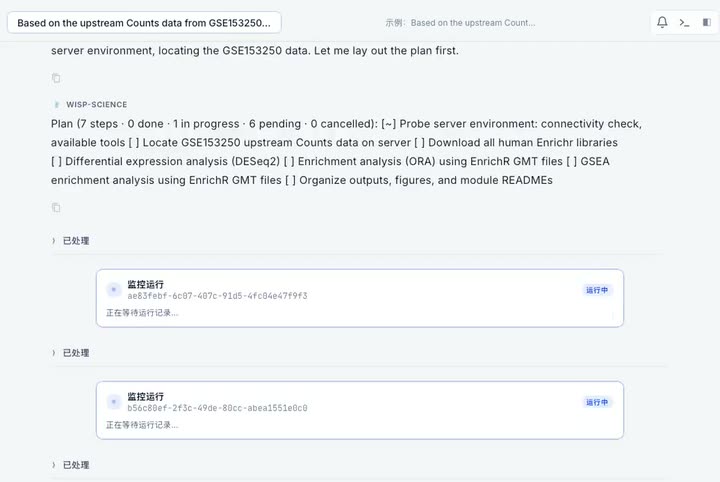
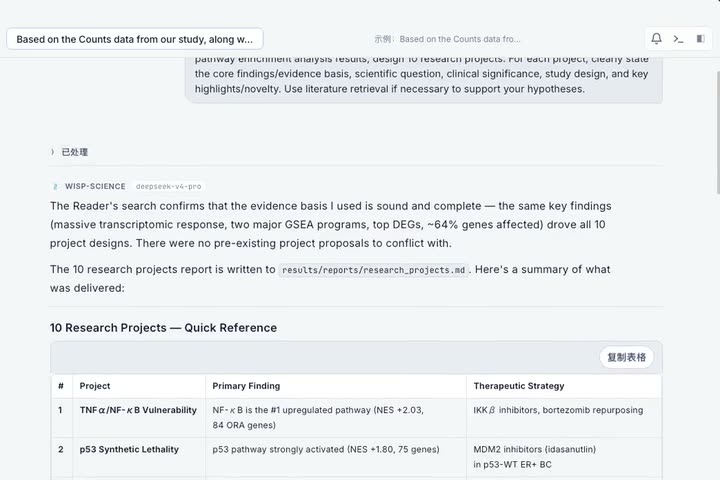
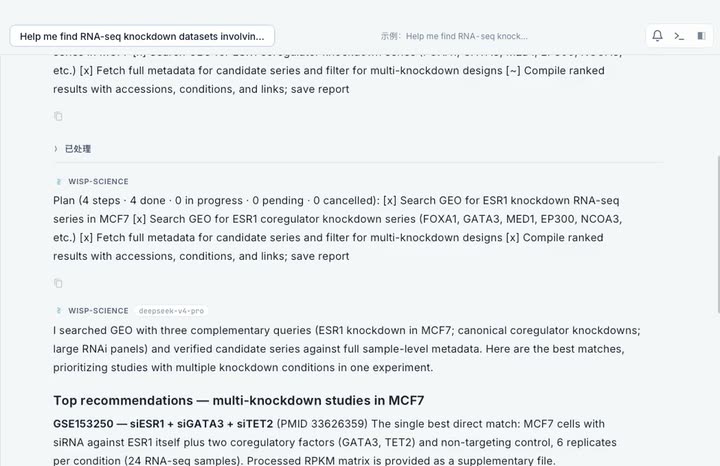
WISP SCIENCE
 Cornell University
 University of Michigan
 UCLA
UCLA Yale University
 Tsinghua University
 Zhejiang University
 Washington University in St. Louis
 Saint Louis University
 Shanghai Jiao Tong University
 Peking University
 Chinese Academy of Sciences
WHAT STAYS WITH YOUR PROJECT
Work with papers and local files, run Python or R, query scientific databases, and keep code, figures, and decisions together. Your project stays on this computer; Wisp Science connects to an outside service only when you use one you configured.
Bring the material for one question into a project without losing track of the original files.
Keep the reasoning behind each step beside the task, so you can review or continue the work later.
Run analysis and reusable workflows in the same project instead of moving data and context between separate tools.
Return to the code, outputs, and conversation that produced a result when you need to check or share it.
Project files, session history, and generated results are stored locally. If a task uses a model, database, ACP agent, or remote compute environment, the information needed for that step is handled under that service’s settings and credentials. Review sensitive material before enabling an outside connection.
A TRACEABLE RESEARCH LOOP
Each stage remains connected to its evidence, code, tools, and generated outputs, so the final report is a record of the work—not just an answer.
Search papers and biological databases, inspect local files, and assemble evidence around the question.
Run persistent Python or R, shell, MCP tools, and domain SKILL workflows while preserving project-scoped state.
Review plans before execution, inspect intermediate files, and trace every artifact back to inputs and code.
Export figures, tables, methods, citations, and narrative reports from one coherent research record.
REPRODUCIBILITY, BUILT INTO THE SESSION
Tables, figures, code blocks, LaTeX equations, and file paths can become artifacts. Each stays connected to its producing conversation, code, logs, inputs, and environment details.
Attach the file already open or any file in the current project without breaking the research context.
Let the agent propose a multi-step method, pause for review, and only continue after approval.
Open tables, figures, code, formulas, and file references together with the context and inputs that produced them.
counts_matrix.h5adsha256 verifiedscanpy_marker_workflow29 steps loggedumap_response.pngcode attachedmethods_and_results.mdcitations linkedRESEARCH PLATES
Compose database retrieval, local computation, domain workflows, and structured writing around the task at hand.
Run Scanpy or scVI-style workflows, annotate populations, and export UMAPs, marker tables, and methods notes.
Fetch sequences and structures, combine AlphaFold-, Boltz-, or OpenFold-style skills, and draft structured interpretation.
Search ChEMBL or PubChem, compare activity data, calculate properties, and prepare SAR-style tables.
Search PubMed or Semantic Scholar, inspect PDFs, draft discussion sections, and keep citations with the text.
DEMO ATLAS
Bundled read-only sessions expose the path from question to evidence and exported output for common life-science tasks.
Raw counts → hit calling → visualization report
Sequence analysis → mutation proposals → activity reasoning
Metagenomic search → cross-database functional annotation
Tumor immunology literature → evidence map → hypotheses
FIELD NOTES FROM THE BENCH
Not a vague “analyze this” prompt, but a concrete research task advanced with evidence, code, and a traceable record.
Start by QCing this single-cell dataset, then help me identify those clusters. Keep every parameter, figure, and rationale—I need to walk through it at lab meeting tomorrow.
Map the preclinical studies on this target from the past five years. Don’t just give me a conclusion—show the sources, conflicting findings, and evidence that is still missing.
Could these mutations affect protein stability? Check the databases and literature first, then give me a locally reproducible analysis plan without moving the raw data off my computer.
I added 20 papers to the project. Organize the controls by experimental system, flag inconsistent numbers, and make every finding traceable to the original text.
Don’t interpret these metabolomics results yet. Check missing values, batch effects, and outliers first, then turn the recommended statistical steps into a rerunnable script.
Search ChEMBL and PubChem for these candidate molecules, compare activity, selectivity, and known risks, then identify the three most valuable experiments to run next.
Anonymous early-user feedback. Identities are summarized, wording has been lightly edited for length and clarity, and portraits are illustrative.
QUESTIONS BEFORE YOU BEGIN
No. It is an open-source desktop and CLI application that uses the model provider and credentials you configure.
It can execute local Python, shell and file tools, call MCP databases, follow domain SKILL workflows, and retain artifact provenance.
Project files, sessions, artifacts, and settings remain local. Prompts and responses still pass through your configured model provider.
Wisp Science is an active preview for local scientific workflows. Review critical methods and outputs, and check release notes for current signing and update status.