
Wisp Science高级用法:Agent Workflow
查看原文面对一个研究问题,我们经常需要同时做几件事:检查已有数据、寻找文献证据、提出不同解释,再把这些材料整理成下一步方案。如果每一步都在同一段对话里临时安排,任务之间的分工、先后顺序和交付要求就容易变得模糊。
Wisp Science 的 Agent Workflow(Agent 工作流) 可以把这些安排保存为一张任务图:哪些任务独立开展,哪些任务需要等待上游结果,每一步允许使用什么能力,以及最后交付什么。
这篇属于高级用法,适合已经完成模型配置、能够在项目中使用文件和工具的读者。可以先阅读 Skills、专家 和 快捷动作,再从一个小工作流开始尝试。
先理解工作流:把分工和依赖关系写清楚。
以文献证据审查为例,支持性证据和挑战性证据可以分别检索,等两边都完成后,再交给综合任务整理。
检索支持性证据 ──┐
                 ├── 综合证据、分歧与缺口
检索挑战性证据 ──┘
图中的每个节点是一项任务,箭头表示依赖关系。没有前置依赖的任务可以并行;后续任务取得所依赖任务的结果后再执行。实际并行程度还受执行器、并发限制和写入约束影响。
普通 Agent 节点由临时子代理执行,可以配置指令、能力、专家角色、执行器和模型。部分工作流还包含 运行活动 节点,把持续计算交给 Wisp 管理的 Run。当前内置的方法搜索就使用了这种节点。
| 组成部分 | 在任务中负责什么 |
|---|---|
| 本轮消息与材料 | 这次研究什么,输入在哪里,有哪些约束 |
| Skill | 提供一项工作的步骤、规范和参考材料 |
| 专家 | 提供可复用的角色与工作要求 |
| Agent Workflow | 组织任务节点、依赖关系、能力和交付要求 |
| 快捷动作 | 从选中文字等场景进入相应任务 |
| Run | 记录和管理一次持续运行的计算任务 |
例如,圆桌工作流可以让不同节点承担不同视角;需要固定实验室的审查规范时,再为节点配置自己的专家。多个节点也可以使用同一个模型,不必为了使用工作流先配置多个模型。
先看当前自带的四个工作流。
进入 设置 → 工作流,打开 Workflow Studio。左侧是工作流库,中间是任务图,右侧是工作流配置与选中任务的摘要。模板名称目前使用英文,可以按下表查找。
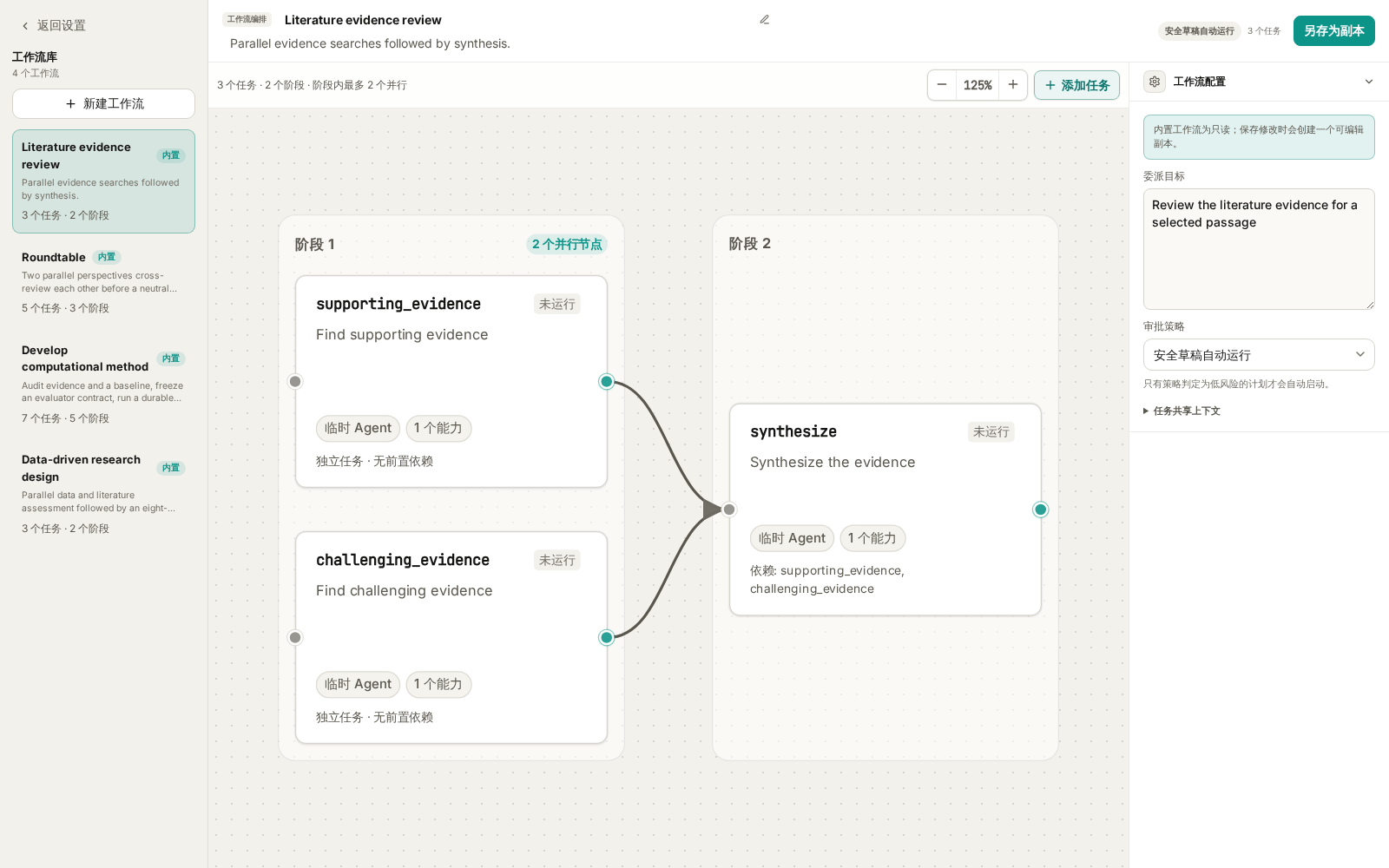
图 1:当前实际前端配合本地示例数据。配图中的节点说明经过简化,用于展示任务结构;没有执行检索或调用模型。
| 内置模板 | 适合的任务 | 默认结构 |
|---|---|---|
Literature evidence review |
核查一个观点的支持证据、反证与适用边界 | 两路检索 → 综合,共 3 个节点 |
Roundtable |
比较研究方案、分析解释或资源投入选择 | 两个独立立场 → 两个交叉审阅 → 主席综合,共 5 个节点 |
Data-driven research design |
从已有数据现象和文献形成可检验的研究设计 | 数据评估与文献评估 → 研究设计,共 3 个节点 |
Develop computational method |
在明确评测条件下改进一个本地 Python 方法 | 三路审计 → 准备评测合约 → 方法搜索 → 审阅 → 报告,共 7 个节点 |
单击节点可以看摘要;双击节点,或点击摘要中的 编辑节点,可以查看完整指令和配置。内置模板的修改需要 另存为副本,不会覆盖原来的内置版本。
工作流库保存的是可重复使用的模板。每次发送任务后产生的执行记录,则在对应会话的 Agents 活动面板中查看。
启动一个工作流:选择模板,补充任务,再发送。
第一次建议使用 Wisp 内置 Agent,并按下面的步骤操作:
- 打开项目,新建一段会话,确认模型可正常使用。
- 在输入框输入
/,在“命令、技能与工作流”选择器中输入模板名称,例如Roundtable。 - 选中“工作流”分组里的目标,确认输入框出现对应的工作流引用。
- 填写本次目标、材料、约束和期望结果,再点击 发送。
- 查看对话和右侧 Agents 面板。若出现待审批草稿,检查后点击 批准并运行;若已启动,直接查看节点进度。
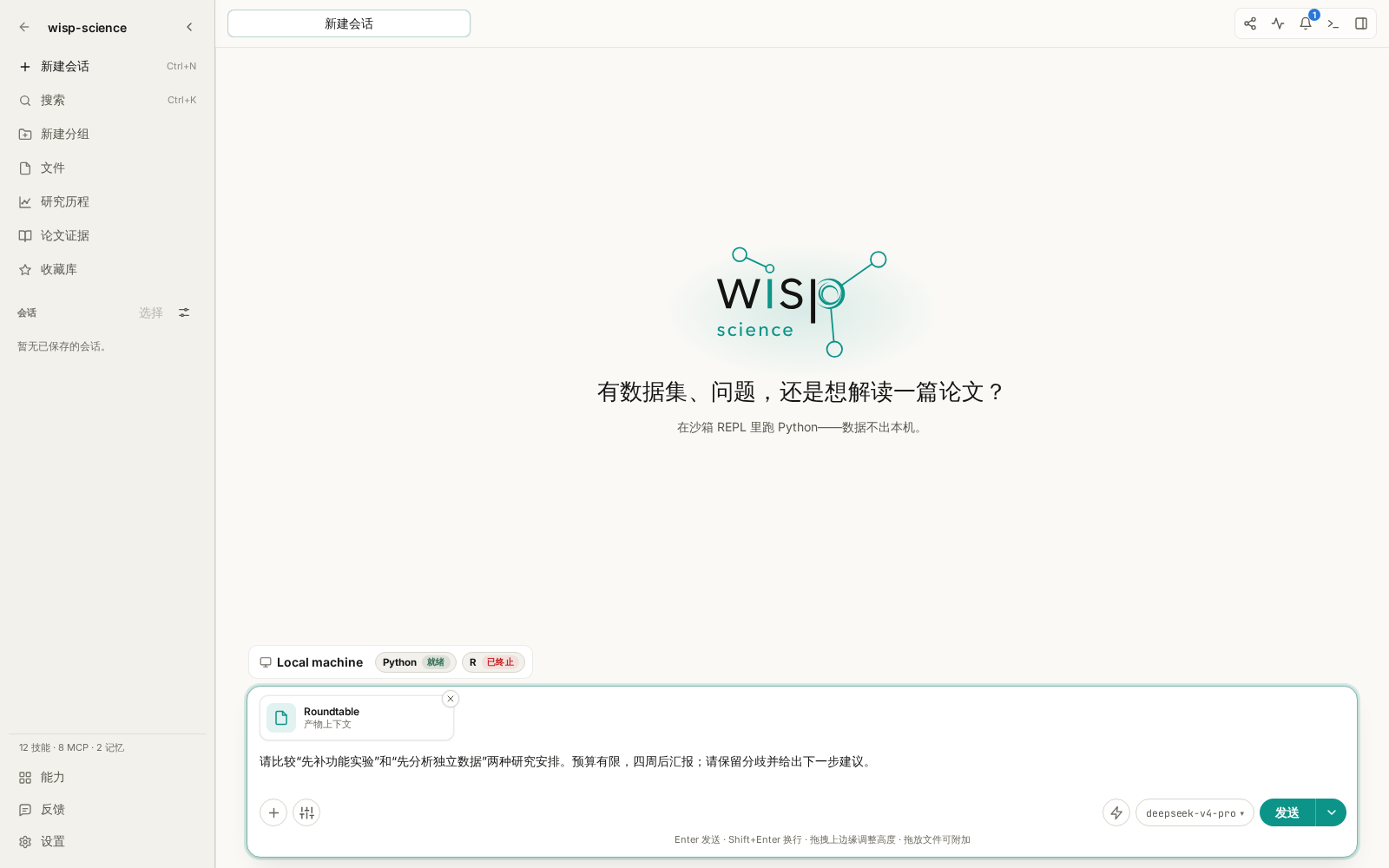
图 2:工作流引用与本轮请求一起发送。截图停在发送前。
选择模板只是把工作流附加到消息,发送后才会交给主 Agent 执行。Wisp 会把当前请求作为工作流上下文,并要求主 Agent 保留模板中的依赖关系,通过委派工具创建任务图。发送工作流引用时,会为这段内置 Agent 会话启用子代理委派。
如果只想了解模板,可以先在设置里查看,也可以询问“请介绍当前有哪些工作流及其用途,暂不运行”。要执行时再附加工作流,并给出具体任务。
模板有两种审批策略:每个草稿都审批,以及 安全草稿自动运行。后者仍由实际解析出的能力和策略决定是否需要确认,并不表示所有任务都直接开始。文献证据审查和圆桌默认采用后一种策略;研究设计和方法开发默认要求审阅草稿。
Literature evidence review:围绕一个明确观点,分别寻找支持与挑战。
适合的输入是一段可检验的判断,最好同时写清研究对象、条件和关注范围。过于宽泛的“帮我调研单细胞”很难让两路检索围绕同一个问题工作。
选中 Literature evidence review 后,可以发送:
请核查这个待验证的观点:“植物根系中某类细胞的比例变化,能够反映其对干旱胁迫的适应。”研究对象限定为拟南芥根系,重点关注单细胞或单核转录组研究。请分别寻找支持证据,以及相反结果、技术偏差和适用边界;区分细胞真实比例变化与解离、取样或注释造成的差异。最后用中文整理结论、文献来源与仍需验证的问题。
这里的观点是教学示例,不是已经确认的科研结论。工作流会按三个节点处理:
| 节点 | 具体工作 |
|---|---|
supporting_evidence |
独立检索支持主要判断的文献,提取实际发现和相关性 |
challenging_evidence |
独立查找反例、边界条件、重复失败和方法学质疑 |
synthesize |
读取两路结果,去重文献,整理支持程度、分歧和缺口 |
两路检索各保留最多 8 篇最相关文献,使用已启用且获授权的文献连接器。综合节点只使用上游结果,不会再开展一轮检索;模板也不要求向项目写入文件。因此,它适合针对具体观点开展一轮有边界的证据审查。
使用前要确认文献检索工具、凭据和网络可用。完成后,重点检查论文是否真实、原文是否支持所述判断,以及综述有没有保留反面证据。需要保存 Markdown 时,可以在工作流完成后继续要求主 Agent 将结果整理到指定路径。
此前教程中的内置快捷动作 文献调研,会向当前输入框附加 literature-review 技能。要运行这里的三节点工作流,应从 / 选择 Literature evidence review,或为它创建自定义快捷动作。
Roundtable:让不同视角先独立思考,再相互审阅。
圆桌适合有取舍的研究决策,例如先补实验还是先扩展分析、两个分析方案各有什么前提、一个现象可能存在哪些替代解释。
它默认安排两个视角:一个侧重证据,一个侧重批判性检查。两者先独立提出观点,再各自读取双方的开场意见并修订建议,最后由中立主席综合。
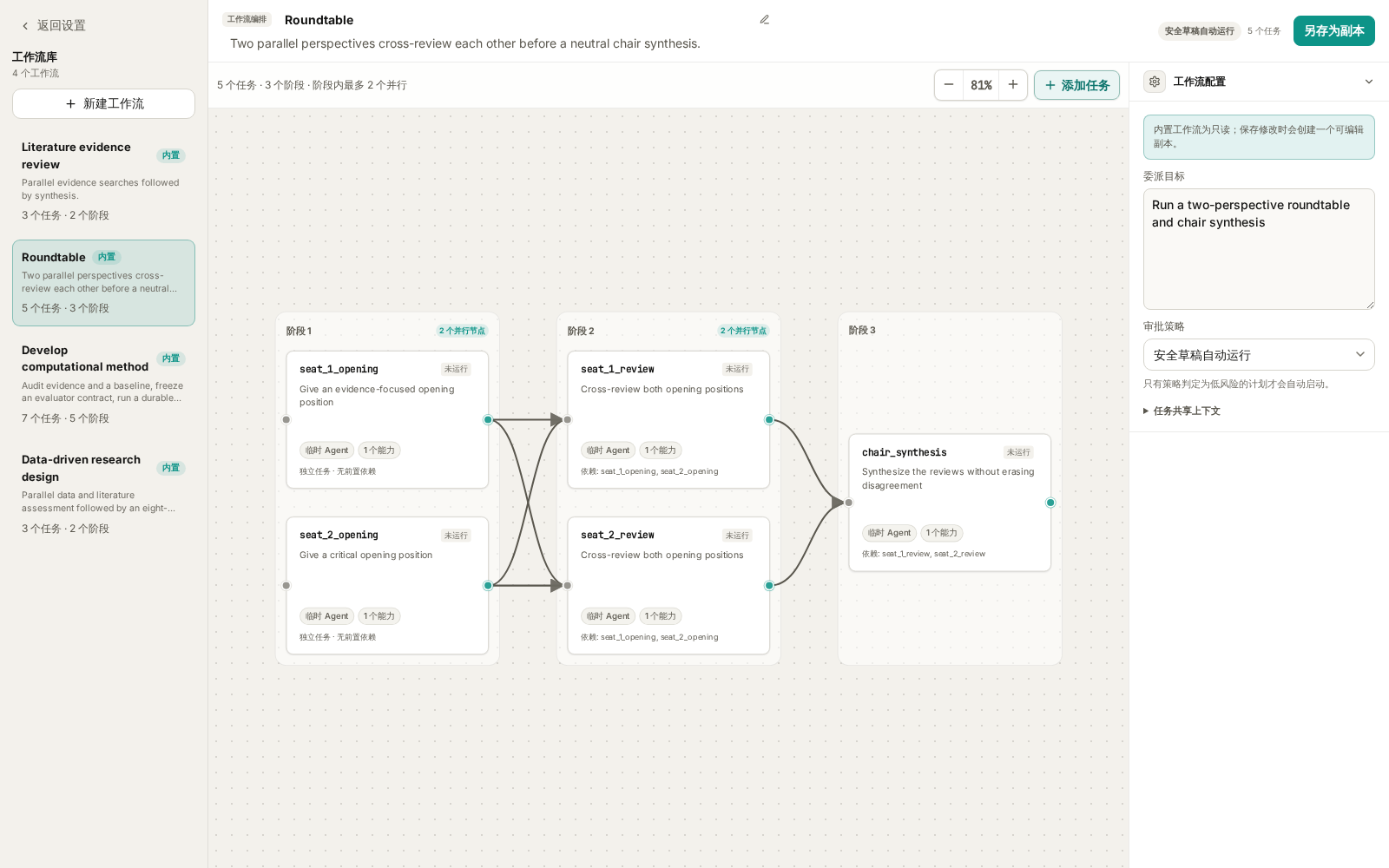
图 3:圆桌的五个节点分为三个阶段,审阅节点都依赖双方开场意见。
证据视角开场 ──┬── 证据视角交叉审阅 ──┐
              │                        ├── 主席综合
批判视角开场 ──┴── 批判视角交叉审阅 ──┘
              (每个审阅节点都读取双方开场意见)
选中 Roundtable 后,可以发送:
我们正在为一个已有初步转录组结果的课题安排下个月工作。方案 A 是补做关键基因的功能验证,方案 B 是先分析独立公开数据,检查结果能否重复。现有条件:只有一名实验人员,预算有限,四周后要做阶段汇报;目前结果主要是相关性,还没有功能实验。请围绕这两种安排开展圆桌讨论,说明各自的前提、收益、失败风险和需要补充的信息。最后给出优先顺序,同时保留无法消除的分歧。
这个内置模板的节点使用推理能力,默认不开展文献检索,也不读取整个项目。需要讨论的事实、证据摘要和约束,应在本次请求中提供;如果希望节点主动检索或读取文件,需要复制模板并配置相应能力。
阅读结果时,可以先看双方的独立意见,再看交叉审阅是否真正回应了对方,最后检查主席有没有保留重要分歧。多个视角并不保证事实正确,事实依据仍应回到材料核对。
想调整角色时,可以另存一份圆桌模板,为对应节点配置专家和模型。同一个参与者在开场与审阅阶段应保持一致的角色,主席则承担综合职责。
Data-driven research design:把观察结果推进到可检验的研究方案。
当你已经有初步组学结果、现象描述或候选机制,希望进一步规划验证,这个模板更合适。它并行开展数据评估与文献评估,再把两路材料综合成研究设计。
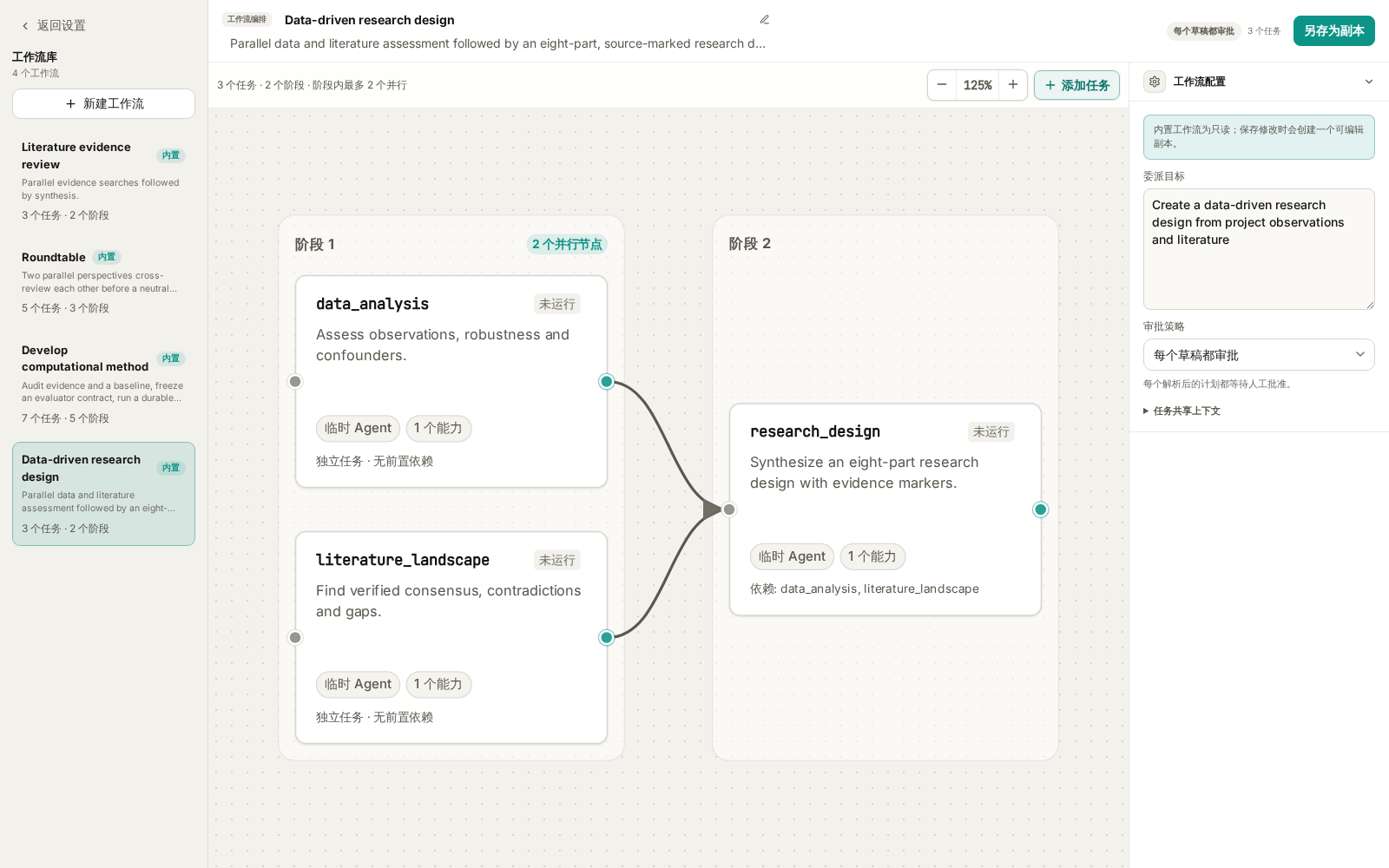
图 4:数据与文献两路结果共同支持后续研究设计,模板默认要求审批草稿。
使用前,准备好可读取的数据或结果文件、样本信息、已有分析方法,以及实验条件和资源限制。数据节点具有代码执行能力,文献节点需要检索能力;实际处理依赖所选执行环境和工具配置。
假设项目中已经存在下列文件,选中 Data-driven research design 后,可以发送:
请根据 results/differential_expression.csv、metadata/samples.csv 和 notes/preliminary-observations.md 制定下一阶段研究方案。先检查差异表达结果是否可能受到批次、样本量和离群值影响,再检索候选通路相关机制的支持与反对证据。把“我们观察到了什么”和“我们推测的机制”分开。实验条件是可做 qPCR 和常规遗传学验证,暂时不能增加大规模测序。请提出能区分替代解释的实验、救援思路,以及实验不支持假设时如何调整方向。不要覆盖已有结果。
请把示例路径换成实际存在的项目文件。运行前审阅草稿,尤其留意数据节点获准使用的工具和执行范围。
最终设计按八个部分组织:
- 数据观察与稳健性。
- 文献共识、冲突与缺口。
- 候选假设与替代解释。
- 从假设推导出的可检验预测。
- 能区分解释的实验与救援设计。
- 验证失败后的假设迭代。
- 转化可行性与风险。
- 证据—主张对应关系与优先级。
数据和文献模块分别带有 [workflow:data_analysis]、[workflow:literature_landscape] 来源标记,综合节点被要求保留这些标记。它们有助于追踪一条建议来自哪一路评估;具体结论仍需结合上游结果、原始数据和论文核验。
这个工作流交付的是研究设计。实际完成哪些数据检查,应以节点工具记录和输出为准;提出一项实验也不表示它已执行。
Develop computational method:先固定评测条件,再开展方法搜索。
这是四个模板中准备要求最高的一个,适合已经有可运行基线、希望改进某个计算方法的任务。例如,在输出误差不超过指定阈值的前提下,优化一个 Python 数值计算函数的运行时间。
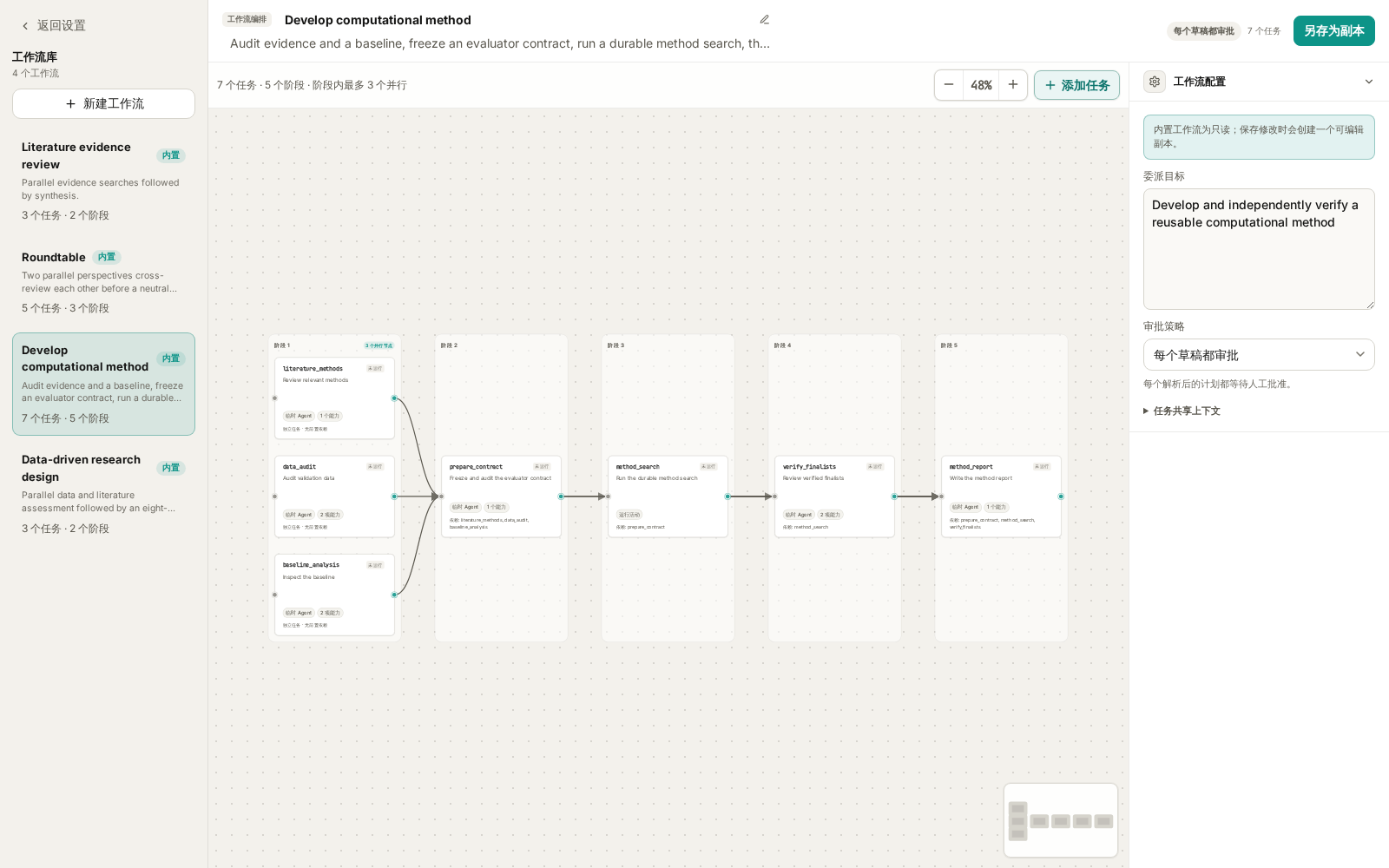
图 5:方法搜索是图中的运行活动。审批整个工作流后,仍需审阅关联 Run 的冻结合约,再开始搜索。
当前方法搜索的范围是 本地 Python、一个声明的函数或类、项目内的固定输入,以及有明确边界的评测器。它不负责远程 GPU 调度、自动下载数据或同时修改多个代码目标。
启动前,至少准备这些信息:
| 材料 | 应说明什么 |
|---|---|
| 科学目标 | 希望改进哪种能力,为什么有研究价值 |
| 基线代码 | 项目内源文件、允许修改的函数或类,以及调用接口 |
| 评测器或评测要求 | 怎样运行,怎样固定随机性,怎样判断候选有效 |
| 验证输入 | 项目内数据路径、格式、划分方式和使用范围 |
| 主指标 | 优化什么,数值越大还是越小越好 |
| 硬性约束 | 精度、输出格式、资源使用或其他不能突破的条件 |
| 独立最终验证数据 | 与搜索阶段区分开的数据及验证要求;没有时明确说明 |
选中 Develop computational method 后,可以参考下面的写法;路径和数值都需要按自己的项目替换:
请改进本项目 src/smoothing.py 中的 smooth_signal 函数,保持现有函数签名和返回数组形状。基线代码已经可运行。验证数据为 data/validation.json,独立最终验证数据为 data/final.json;后者只能用于最终验证,不能用于候选选择。评测器为 benchmarks/evaluate.py。主指标为固定输入上的中位运行时间,越低越好;硬性约束为相对参考输出的最大绝对误差不超过 1e-6,所有结果必须为有限值。请先审计文献、数据划分和基线,再准备评测合约;使用模板的搜索预算,等待我审阅后开始搜索。最终报告改进幅度、独立验证结果和局限。
它的执行顺序是:
文献方法检索 ──┐
数据审计 ──────┼── 准备评测合约 ── 方法搜索 Run ── 审阅入选方法 ── 方法报告
基线分析 ──────┘
这里有两次不同的审批。 第一次是批准工作流计划,允许准备和审计。准备完成后,方法搜索会创建一个草稿 Run,此时还没有开始候选搜索。需要进入关联的 Run 详情,打开 审核方法搜索,核对 冻结评测合约 中的目标、评测器、基线、噪声下限、受保护输入和预算,再点击 批准并开始搜索。
“冻结”表示搜索使用已经审计并绑定的那一份代码、数据和评测条件。启动或恢复时会重新检查,不能把修改后的文件悄悄当成原来的输入。
内置模板的搜索上限为 20 个候选、总时长 14,400 秒(4 小时)、单次评测 120 秒、费用预算 5,000,000 微单位。这些是上限,不是预计耗时或固定收费。运行时可在 Run 详情查看候选、指标和进度,并使用暂停、继续或取消;暂停在候选检查点生效。
完成后,重点检查改进是否超过基线噪声,以及结果属于 独立最终验证 还是 仅验证集(validation_only)。缺少独立最终验证时,不能把验证集上的提升写成已经通过独立验证。
搜索不会把选中的候选代码自动应用到项目源文件,入选代码以产物版本保存。先检查候选差异、评测记录和复现要求,再决定是否采用。方法报告也可能得出“没有找到满足约束的改进”,这同样是有效结果。
查看结果时,沿着任务图检查依据。
运行后打开对应会话的 Agents 面板,可以查看各节点的状态和结果。完成的节点可通过 查看完整结果 检查交付内容;带运行活动的节点还需要查看关联 Run。
| 状态或现象 | 下一步 |
|---|---|
| 草稿 | 核对目标、依赖、能力和需要审批的原因,再批准或撤销 |
| 运行中 | 查看当前节点活动,确认是否在等待工具调用或用户操作 |
| 等待运行完成 | 打开关联 Run;方法搜索可能仍在等待第二次审批 |
| 失败或已阻塞 | 先检查上游错误、工具配置、输入路径与输出要求,再考虑重试 |
| 已完成 | 核对每个节点的证据和交付内容,再阅读最终综合 |
| 只有模板介绍,没有任务记录 | 确认已从 / 附加工作流并发送;继续要求按所选模板实际创建和执行工作流 |
下游任务依赖上游结果。某个节点失败时,后续综合可能无法继续,先解决输入、权限或依赖问题,比反复重跑整个工作流更有帮助。
熟悉内置模板后,再保存自己的小工作流。
进入 设置 → 工作流 → 新建工作流,可以选择空白、从模板创建,或从 Skills 转换。第一次自定义,建议从已经试用过的模板创建副本。
例如,把圆桌副本命名为“组会方案讨论”,在共享上下文里写入实验室固定的时间与资源约束,再调整参与者的审阅要求。每次变化的研究问题、结果和文件路径,仍放在发送时的消息中。
编辑时,先写清节点要交付什么,再选择实际需要的能力。让汇总节点依赖它要使用的所有上游结果;连线必须保持无环。如果为 Agent 节点配置了输出 JSON Schema,上游应确实能交付符合格式的结果。
需要调整模型、执行器、Token 或工具调用预算时,再展开 高级执行控制。运行活动节点有自己的输入和候选数、时长、费用限制,不能直接套用普通 Agent 节点的控制项。
保存模板只完成配置,不会启动任务。回到输入框,通过 / 选中保存后的工作流,用一份小材料试运行。确认结果符合预期后,也可以按 快捷动作教程 将它绑定到选中文本菜单。
完整的逐步配置示例,以及“空白、基于模板、基于 Skill”三种创建方式,见下一篇 创建 Agent Workflow。
可以先用 Roundtable 讨论一个熟悉的研究选择,检查分工与交叉审阅;再使用 Literature evidence review 核查一条具体判断。已有数据与研究条件时尝试研究设计,具备可运行基线和评测条件后再尝试方法搜索。
本文依据当前仓库的内置模板、桌面界面与执行实现整理。提示词、路径和阈值用于教学,不代表已经执行的科研任务。进一步的机制说明见 Agent delegation。
A research question often involves several kinds of work: examining data, finding published evidence, considering alternative explanations, and deciding what to do next. An Agent Workflow saves that division of work as a task graph, including dependencies, capabilities, and expected outputs.
This advanced tutorial assumes you have configured a model and can use files and tools in a project. For background, see Skills, Specialists, and Quick Actions.
A workflow makes the division of work and dependencies explicit.
For a literature evidence review, supporting and challenging evidence can be searched independently. Synthesis waits for both results.
Supporting evidence ──┐
                      ├── Synthesis, disagreements, and gaps
Challenging evidence ─┘
Each node is a task; an arrow declares a dependency. Independent tasks can run in parallel, subject to concurrency, executor, and write restrictions. Dependent tasks receive upstream results before proceeding.
Ordinary Agent nodes run as temporary subagents with instructions, capabilities, and optional specialist, executor, and model choices. A Run activity delegates sustained computation to a host-managed Run. The built-in method-development workflow uses one of these nodes.
| Component | Responsibility |
|---|---|
| Current message and material | The specific question, inputs, and constraints |
| Skill | A reusable method, procedure, and reference material |
| Specialist | A reusable role and working instructions |
| Agent Workflow | Task nodes, dependencies, capabilities, and outputs |
| Quick Action | A contextual entry point, such as selected text |
| Run | The record and lifecycle of a sustained computation |
Nodes may use the same model. Multiple model configurations are not a prerequisite for using workflows.
Start with the four built-in workflows.
Open Settings → Workflows to enter Workflow Studio. The library is on the left, the graph is in the center, and workflow configuration and the selected task summary are on the right.
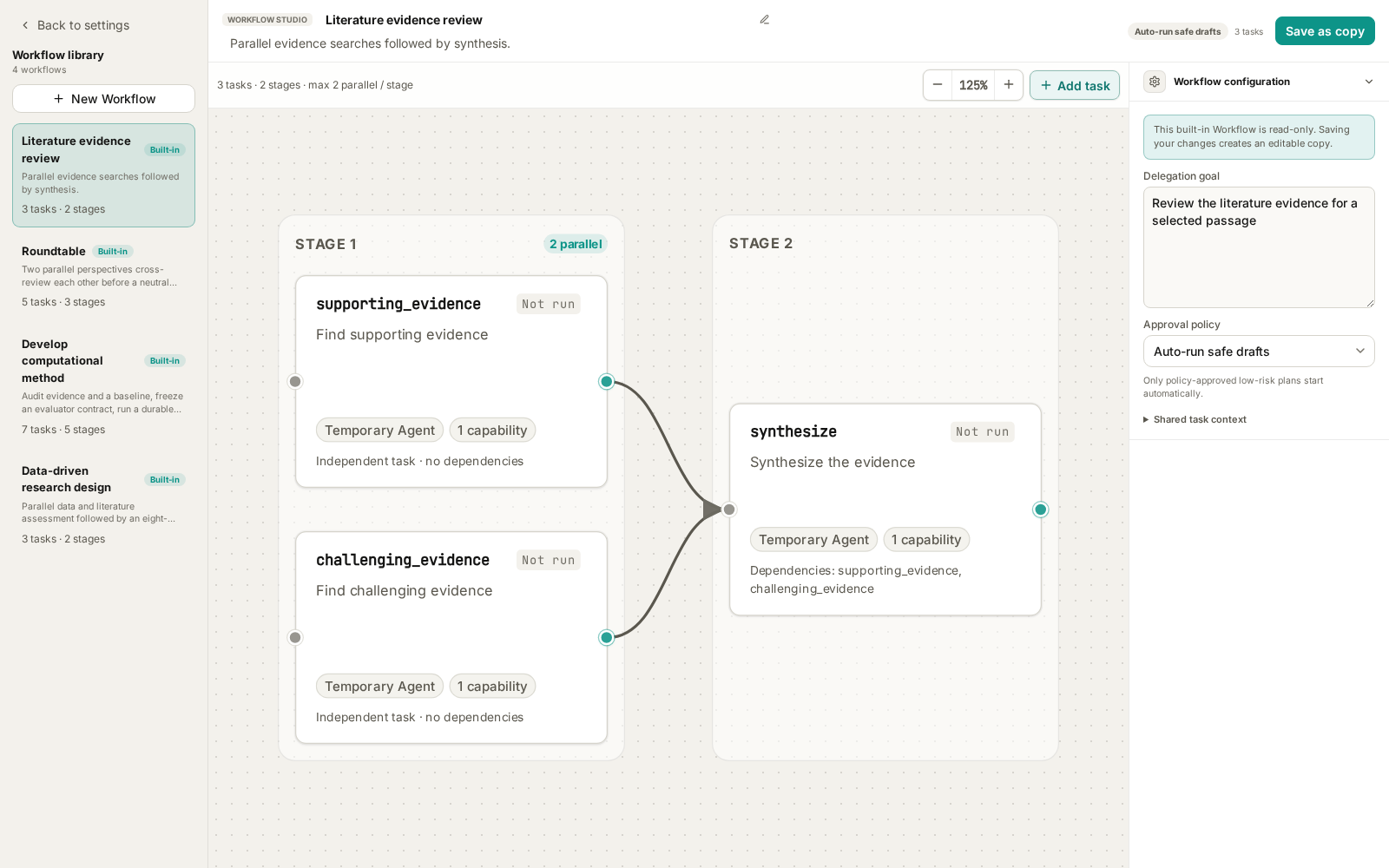
Figure 1: The current frontend with local fixture data. Node instructions are shortened to illustrate the structure. No searches or model calls were executed for these screenshots.
| Built-in template | Suitable task | Default structure |
|---|---|---|
Literature evidence review |
Examine support, contradictions, and limits of a claim | Two searches → synthesis; 3 nodes |
Roundtable |
Compare research plans, explanations, or resource choices | Two openings → two cross-reviews → chair synthesis; 5 nodes |
Data-driven research design |
Turn observations and literature into a testable research design | Data and literature assessment → research design; 3 nodes |
Develop computational method |
Improve a local Python method against a defined evaluator | Three audits → contract preparation → method search → review → report; 7 nodes |
Click a node for its summary. Double-click it, or choose Edit node, to inspect the complete instructions and configuration. Saving changes to a built-in creates a custom copy through Save as copy.
The library stores reusable templates. Execution records appear in the corresponding conversation's Agents panel.
Select a workflow, add your request, and send.
For a first attempt, use Wisp's native Agent:
- Open a project and a new conversation with a working model.
- Type
/in the composer and search for a template, such asRoundtable. - Select it from the workflow group and confirm that its reference appears in the composer.
- Describe the goal, material, constraints, and expected result, then send.
- Check the conversation and Agents panel. Review any pending draft and choose Approve and run, or follow progress if it has already started.
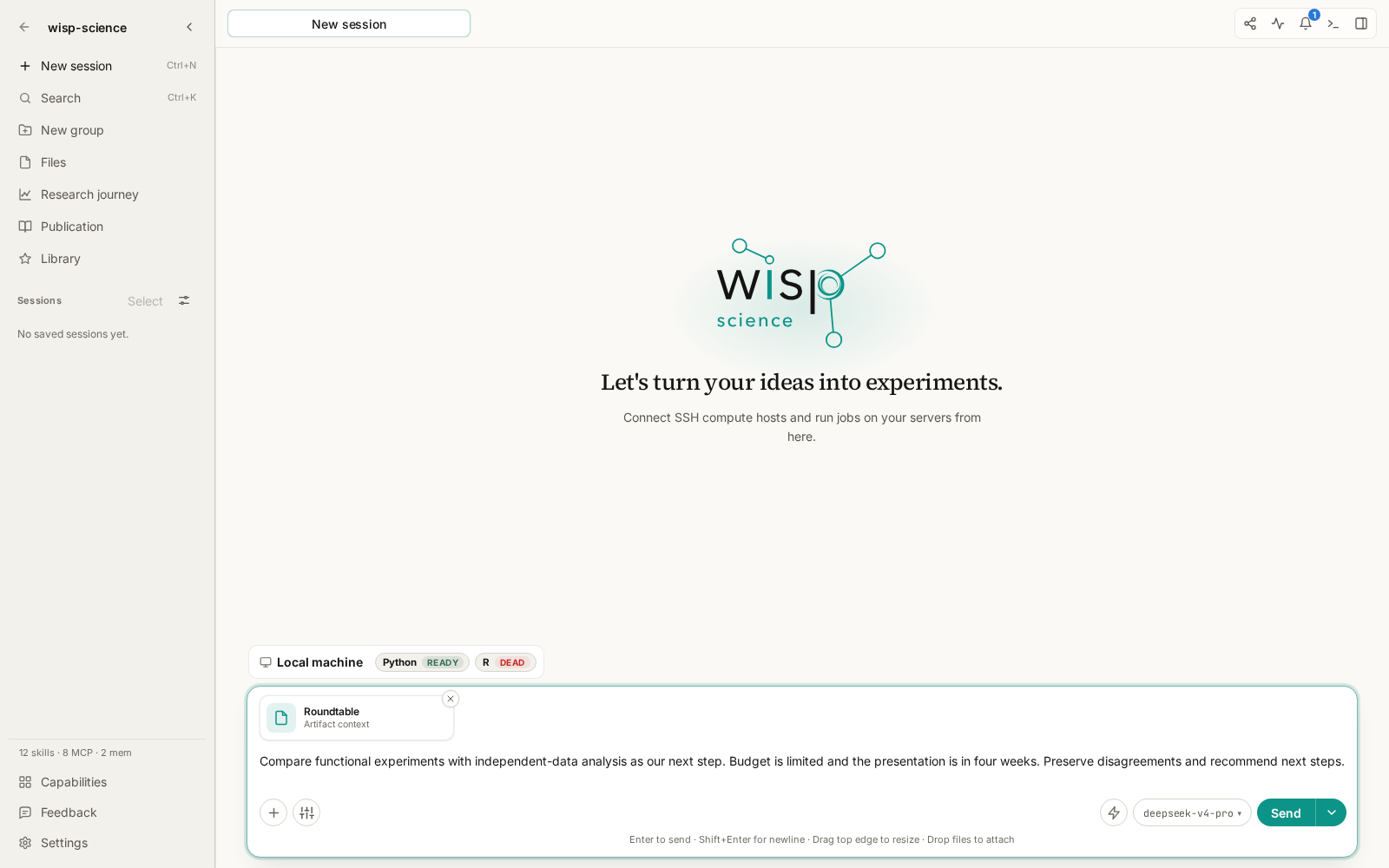
Figure 2: The workflow reference travels with the request. This screenshot stops before sending.
Selecting a template attaches it; sending asks the main Agent to execute it. Wisp supplies the request as context and instructs the Agent to preserve the graph's dependencies when delegating. Sending a workflow reference enables delegation for that native conversation.
To inspect without running, browse Settings or ask the Agent to explain available workflows without starting them. Attach a workflow when you are ready to execute a concrete request.
The approval policies are Review every draft and Auto-run safe drafts. Automatic execution still depends on the resolved capabilities and policy. Literature review and Roundtable use the latter by default; research design and method development require draft review.
Literature evidence review: search for support and challenges to a specific claim.
Provide a testable statement with a defined organism, condition, and scope. After selecting Literature evidence review, you might send:
Assess this unverified claim: “Changes in the proportion of a root cell type reflect its adaptation to drought.” Limit the scope to Arabidopsis roots and single-cell or single-nucleus transcriptomics. Find supporting evidence as well as contradictory findings, technical biases, and boundary conditions. Distinguish true proportion changes from dissociation, sampling, and annotation effects. Summarize conclusions, sources, and unresolved questions.
This is a teaching example, not an established scientific conclusion.
| Node | Work |
|---|---|
supporting_evidence |
Independently search for supporting publications and extract actual findings |
challenging_evidence |
Search for contradictions, boundary conditions, failed replications, and methodological critiques |
synthesize |
Deduplicate sources and reconcile evidence, disagreements, and gaps |
Each search keeps at most eight relevant papers and uses enabled, authorized literature connectors. Synthesis uses only the upstream results; it does not search again. The template does not ask nodes to write project files.
Configure the required connectors, credentials, and network access first. Afterwards, verify that the papers exist and support the stated findings, including contrary evidence. If you want a Markdown report, ask the main Agent to save the completed result to a specified path.
The built-in Research literature Quick Action instead attaches the literature-review Skill to the current composer. To execute this three-node graph, select the workflow through / or bind it to a custom Quick Action.
Roundtable: independent positions followed by cross-review.
Use Roundtable for decisions involving trade-offs: additional experiments versus further analysis, competing methods, or alternative explanations.
One participant focuses on evidence and another on criticism. Both present independent positions, each reviews both openings, and a neutral chair synthesizes their revised recommendations.
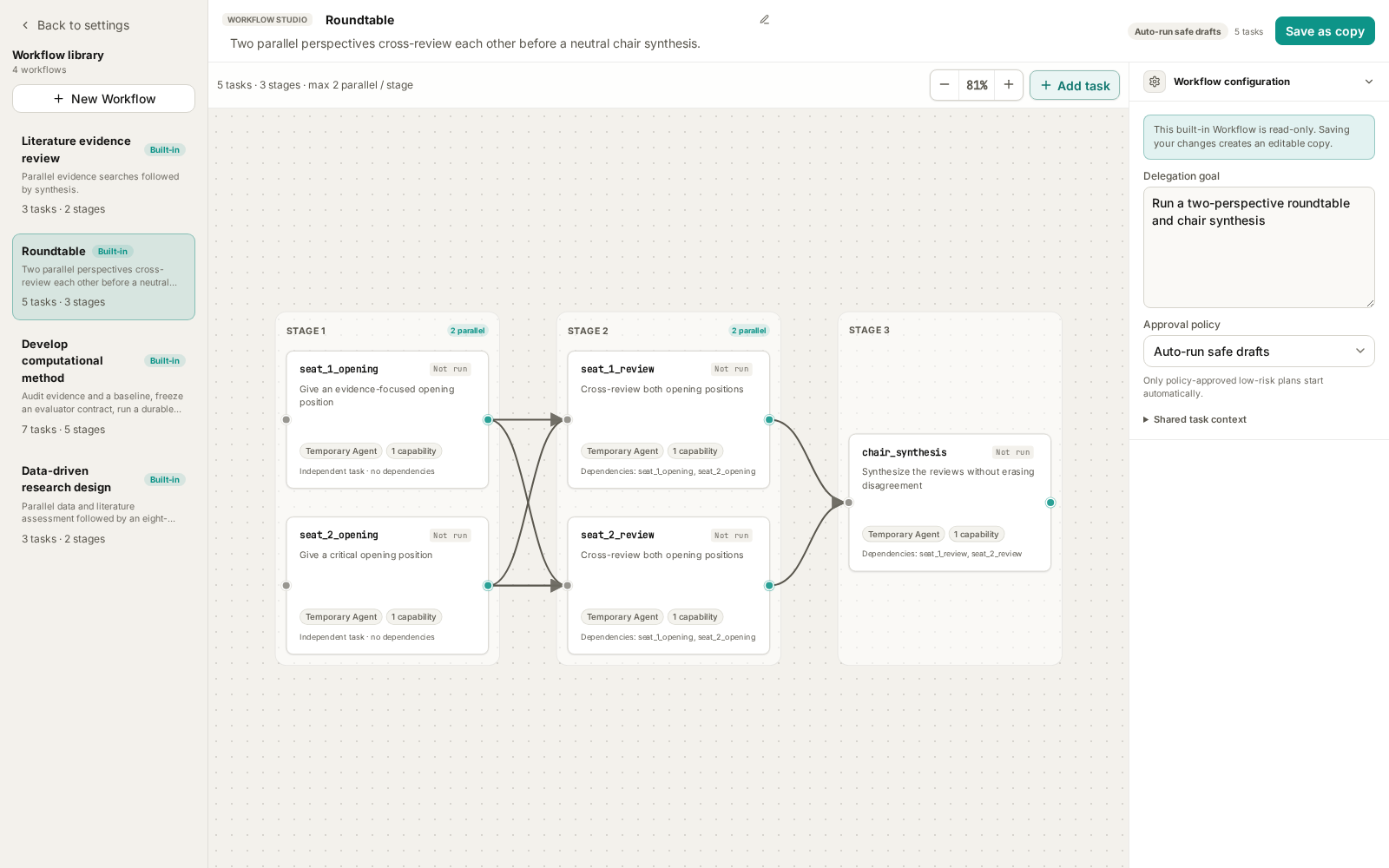
Figure 3: Five nodes in three stages. Each review depends on both opening positions.
After selecting Roundtable, try:
We have preliminary transcriptome results and need to plan next month's work. Option A is functional validation of key genes; option B is analysis of an independent public dataset to assess reproducibility. We have one experimental researcher, a limited budget, and a progress presentation in four weeks. Current evidence is correlational, with no functional experiment. Compare assumptions, benefits, failure risks, and missing information. Recommend priorities while retaining unresolved disagreements.
The built-in nodes use reasoning. They do not search literature or read the entire project by default. Supply relevant facts, evidence summaries, and constraints in the request. To add active retrieval or file reading, create a copy and configure those capabilities.
Read the independent positions, then check whether the cross-reviews actually respond to each other and whether the chair preserves important dissent. Multiple perspectives still require factual verification against the source material.
For custom roles, save a copy and configure specialists and models. Keep each participant's role consistent between its opening and review nodes; the chair has a separate synthesis role.
Data-driven research design: move from observations to testable plans.
Use this workflow when you have preliminary omics results, observations, or a candidate mechanism and want to plan validation. Data assessment and literature assessment run independently before synthesis.
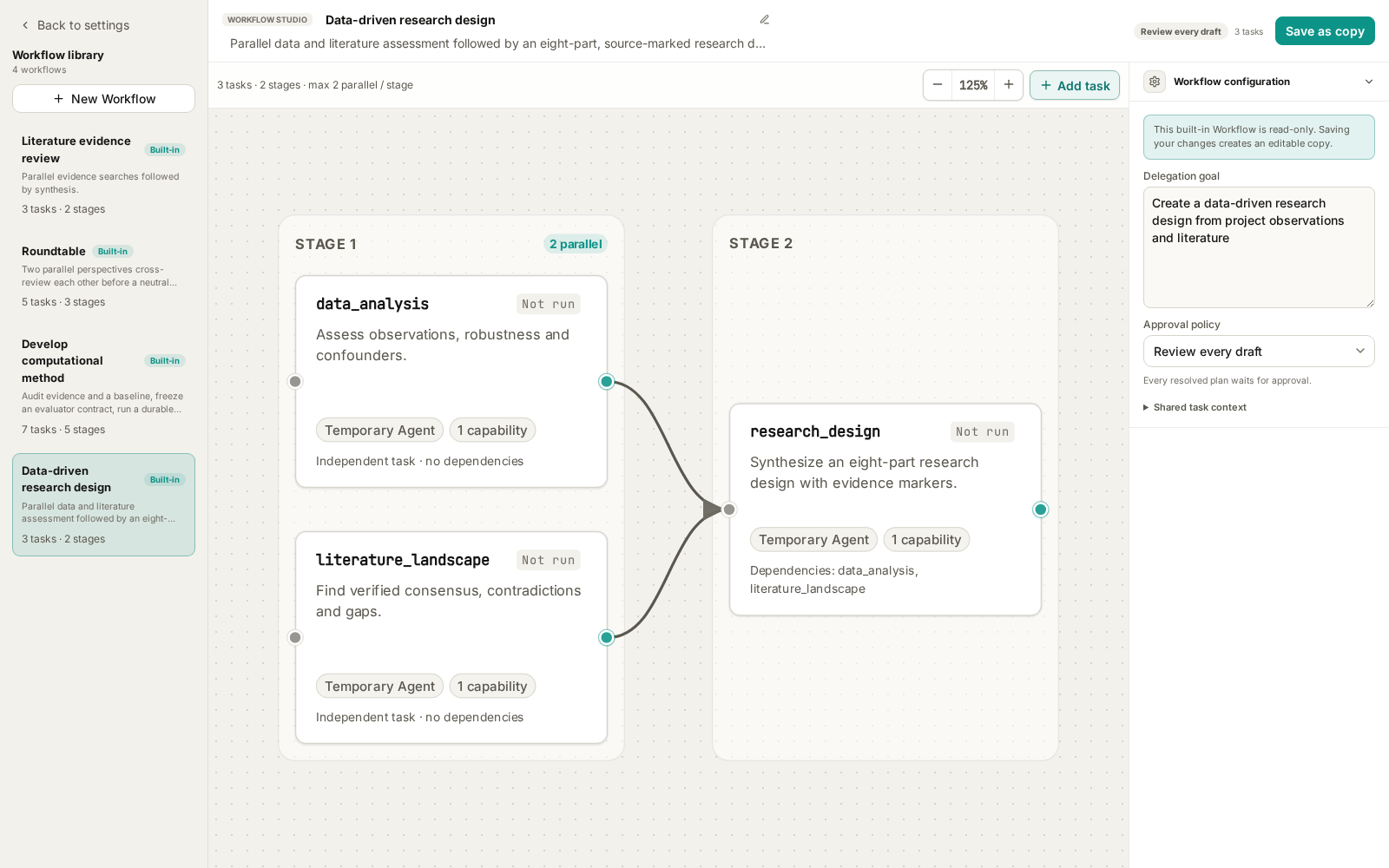
Figure 4: Two evidence streams support the design. Draft approval is required by default.
Prepare accessible data or result files, sample metadata, existing methods, and resource constraints. The data node requests code execution; the literature node needs search capabilities. Actual work depends on the configured tools and execution environment.
If these files exist in your project, select Data-driven research design and send:
Develop a next-stage research plan from results/differential_expression.csv, metadata/samples.csv, and notes/preliminary-observations.md. Examine batch effects, sample size, and outliers, then search for supporting and opposing evidence about the candidate pathway. Separate observations from proposed mechanisms. We can perform qPCR and conventional genetic validation, but cannot add large-scale sequencing. Propose discriminating experiments, rescue approaches, and how to revise the hypothesis if experiments disagree. Do not overwrite existing results.
Replace the example paths with real files. Review the draft, particularly the tools and execution scope of the data node.
The final design has eight parts:
- Data observations and robustness.
- Literature consensus, conflicts, and gaps.
- Candidate hypotheses and alternatives.
- Deductive predictions.
- Discriminating experiments and rescue.
- Failure-driven hypothesis iteration.
- Translation feasibility and risks.
- An evidence–claim matrix and priorities.
The upstream modules carry [workflow:data_analysis] and [workflow:literature_landscape] markers, which synthesis is instructed to retain. These help trace recommendations to the appropriate assessment; verify individual claims against node results, original data, and papers.
The deliverable is a research design. Tool records show which checks were actually performed. A proposed experiment is not a completed experiment.
Develop computational method: freeze evaluation conditions before searching.
This template requires the most preparation. It is appropriate when a working baseline already exists, such as a Python numerical function whose runtime you want to improve within a stated error bound.
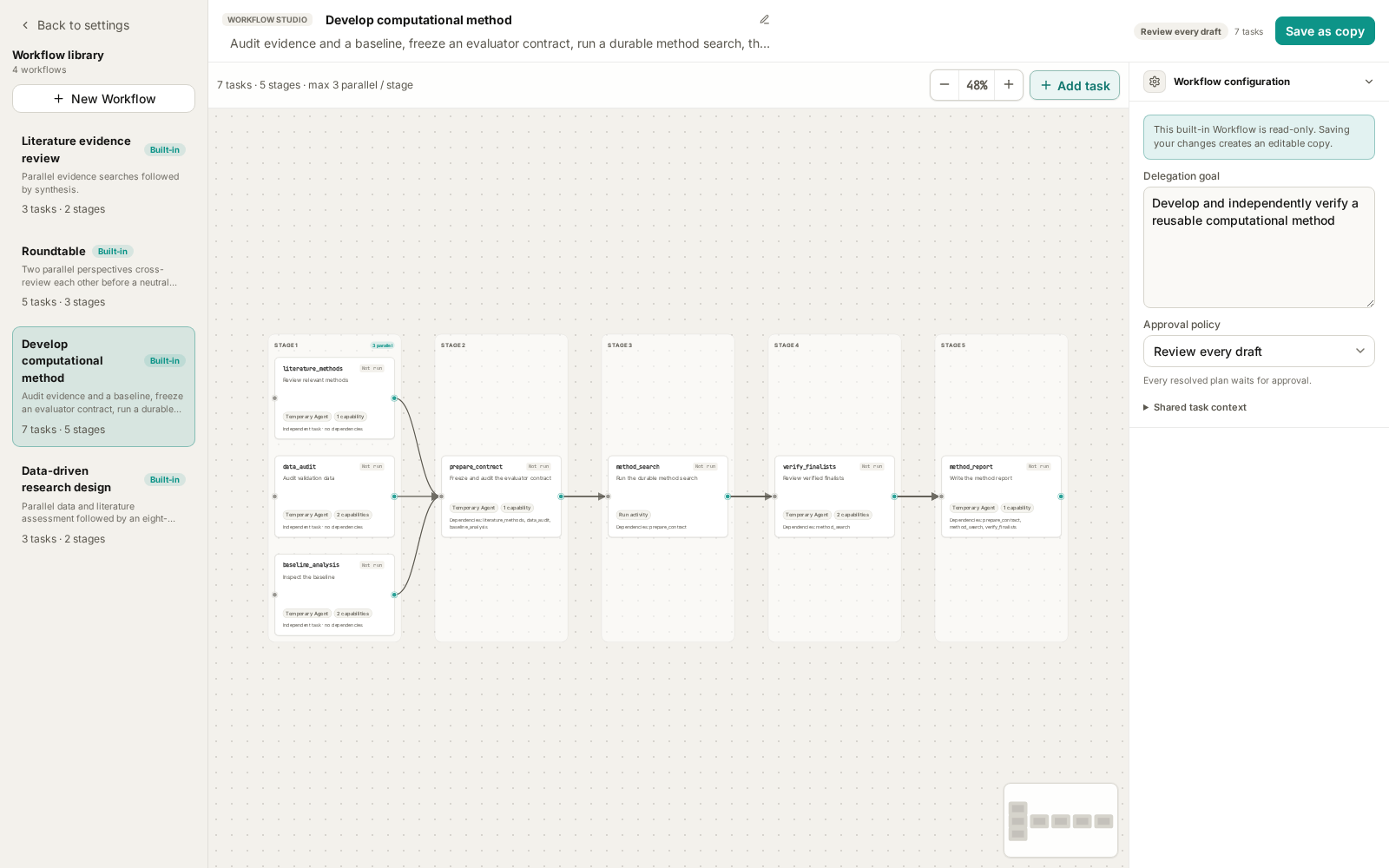
Figure 5: Method search is a Run activity. Workflow approval is followed by a separate review of its frozen contract before search starts.
The current scope is local Python, one declared function or class, immutable project-local inputs, and a bounded evaluator. It does not provide remote GPU scheduling, automatic data downloads, or multi-target source edits.
| Required material | What to specify |
|---|---|
| Scientific objective | The desired improvement and its purpose |
| Baseline | Source file, editable function/class, and interface |
| Evaluator or evaluation requirements | Invocation, deterministic conditions, and validity rules |
| Validation inputs | Paths, formats, splits, and permitted use |
| Primary metric | What is optimized and in which direction |
| Hard guardrails | Accuracy, output, resource, or other constraints |
| Independent final-verification data | Inputs reserved for final verification; explicitly state if absent |
After selecting Develop computational method, adapt this example to your project:
Improve smooth_signal in src/smoothing.py, preserving its signature and output shape. The baseline runs successfully. Validation data is data/validation.json; independent final-verification data is data/final.json and must not be used for candidate selection. The evaluator is benchmarks/evaluate.py. Minimize median runtime on fixed inputs. Maximum absolute error against the reference output must not exceed 1e-6, and all outputs must be finite. Audit literature, data splits, and baseline before preparing the contract. Use the template's search limits and wait for my contract review before searching. Report improvement, independent verification, and limitations.
The sequence is:
Literature methods ─┐
Data audit ─────────┼── Prepare contract → Search Run → Finalist review → Report
Baseline analysis ──┘
There are two distinct approvals. Approving the workflow permits preparation and auditing. Preparation produces a draft Run; candidate search has not started. Open the linked Run, inspect the method-search contract, and check its target, evaluator, baseline, noise floor, protected inputs, and budgets. Then choose the action to approve and start search.
The frozen contract binds the audited versions of code, data, and evaluation conditions. Start and resume revalidate them rather than silently substituting changed files.
The built-in limits are 20 candidates, 14,400 wall-clock seconds (four hours), 120 seconds per evaluation, and 5,000,000 cost microunits. These are ceilings, not a runtime estimate or fixed price. Follow candidates, metrics, and progress in Run detail. Pause takes effect at a durable candidate boundary; resume and cancel are also available.
Check whether improvement exceeds baseline noise and whether the result has independent final verification or is validation-only (validation_only). Validation-set gains alone must not be presented as independent verification.
Selected code is saved as an artifact version and is not automatically applied to project source. Inspect differences, evaluation history, and reproduction instructions before adopting it. Finding no improvement that satisfies the constraints is also a valid outcome.
Follow the graph when reviewing results.
Open the conversation's Agents panel to inspect task states and complete results. Run activities also link to their associated Run.
| State or symptom | Next step |
|---|---|
| Draft | Review goal, dependencies, capabilities, and approval reasons |
| Running | Inspect current node activity and any pending tool or user interaction |
| Waiting for Run | Open the Run; method search may need its second approval |
| Failed or blocked | Check upstream errors, tools, paths, and output requirements before retrying |
| Completed | Inspect evidence and outputs before relying on synthesis |
| Only an explanation, no task record | Confirm that you attached and sent the workflow; ask the Agent to create and execute its graph |
Failed upstream nodes can block dependent synthesis. Resolve the specific input, permission, or dependency problem before repeatedly rerunning the whole graph.
Create a small custom workflow after trying the built-ins.
Use Settings → Workflows → New workflow to start blank, copy a template, or convert Skills. A tried-and-tested template is a useful starting point. For example, copy Roundtable, name it “Lab meeting planning,” save recurring resource constraints as shared context, and refine the participants' instructions. Keep changing questions and file paths in each request.
Give every node a clear deliverable and the capabilities it needs. Make synthesis depend on all relevant results and keep the graph acyclic. If you configure an output JSON Schema, ensure the node can produce that contract.
Use advanced execution controls when you need explicit models, executors, or budgets. Run activities have separate input and candidate/time/cost limits; ordinary Agent controls do not apply to them.
Saving a template does not start it. Return to /, select the saved workflow, and try a small input. You can later bind it to a Quick Action.
For a complete walkthrough of all three creation routes, see Creating an Agent Workflow.
Start with Roundtable for a familiar decision, then use literature review for a specific claim. Move to research design when data and constraints are available, and to method search once you have a runnable baseline and evaluator.
Based on the current repository's templates, desktop UI, and execution implementation. Prompts, paths, and thresholds are teaching examples, not completed research. See Agent delegation for implementation details.